
How to Use a Public EV Charger: Start, Check and Stop Your Charge
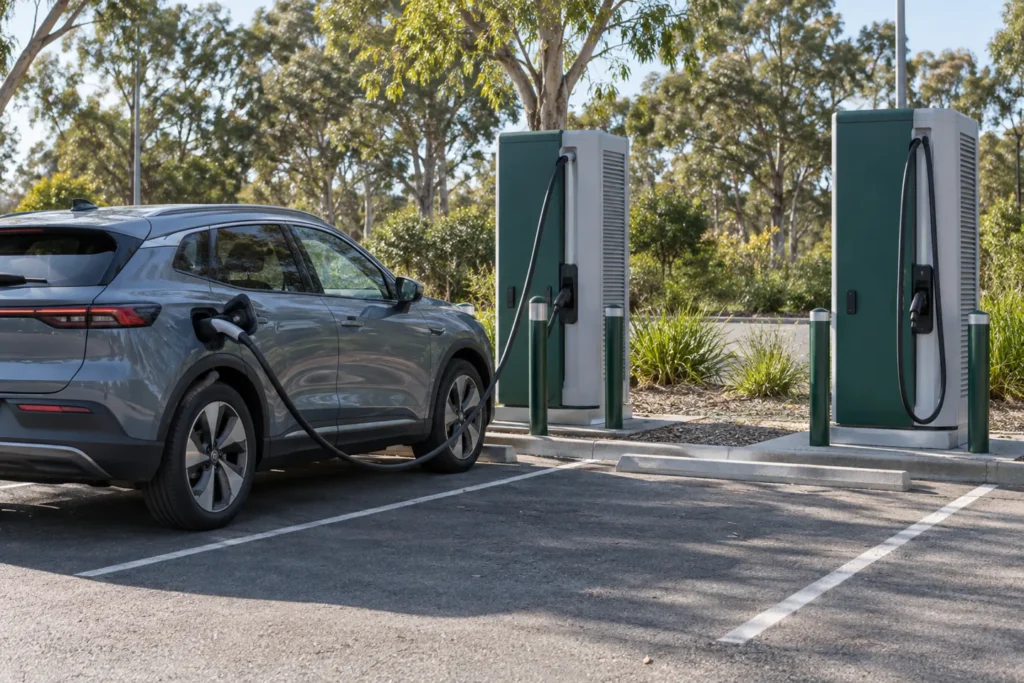
To use a public EV charger, match the connector to your car, follow that charger’s payment and connection prompts, and confirm that charging has actually started. A cable being plugged in isn’t proof that energy is flowing. Before leaving the car, check the vehicle or charger display for an active session.
By EV Charger Near Me Team. Network instructions checked 2 November 2026. This guide explains how to use a public EV charger in Australia; the steps on your particular unit take priority.
Check the site before driving there
Use the operator’s current map or app to check connector compatibility, access hours, pricing and reported status. A listing shows where a charger is located; it can’t guarantee that a bay will be free when you arrive. Pick a backup stop if you depend on this charge to continue your trip.
Check your vehicle handbook for the connectors it supports and whether you need to bring an AC cable. Our CCS versus Type 2 guide explains the connector distinction. Don’t assume that every cable at a station will fit, or that every charger with a familiar logo is available to your vehicle.
For route planning, browse Sydney charging locations or Melbourne charging locations. Confirm the chosen site’s live details with the network before diverting.
Park, identify your connector and choose payment
Park so the cable reaches without being pulled tight or crossing another bay. Read the parking signs as well as the charger screen. Site parking charges and time limits can apply separately from the electricity price.
Check the station number and connector label before selecting a plug in an app. A site can contain several units, and selecting the wrong one won’t start the cable attached to your car. Inspect the connector for obvious damage; if something looks broken, choose another unit and report it using the operator’s contact details.
Payment isn’t identical across networks. You may need an app account, an accepted RFID card, an enabled automatic-payment arrangement or a bank-card terminal. Set up the method the site actually supports. Our charging payment guide covers the options in more detail.
Follow the network’s start sequence
Chargefox’s driver guidance describes creating an app account, plugging in and starting the charge. Evie’s app instructions similarly say to plug in, select the station and connector, then start charging. Follow the unit’s prompts if its sequence differs.
At an Evie site equipped for Tap & Go, the published process is to plug in and tap a debit card at the terminal. That method doesn’t require an Evie account, but it isn’t available at every site. Check the displayed tariff and any temporary card hold before starting.
Evie Autocharge is a separate option that needs prior setup and an eligible vehicle and charger. Don’t arrive assuming that plugging in any EV will automatically authorise payment.
| Published method | Start check | End check |
|---|---|---|
| Chargefox app | Create the account, plug in and start the selected session in the app. | Use the session’s normal stop control; confirm it has ended before following your vehicle’s unlock procedure. |
| Evie app | Plug in, select the station and connector, then start. | Stop the selected session through its normal control and confirm the end. |
| Evie Tap & Go, where fitted | Plug in and tap the accepted card at the terminal. | Tap the same card again and select Stop, as Evie’s instructions specify. |
Find candidate stops on the charger map, or save a route through the journey planner. Check the operator’s live status before travelling. The session cost guide helps you account for parking and applicable fees.
Confirm energy is flowing before walking away
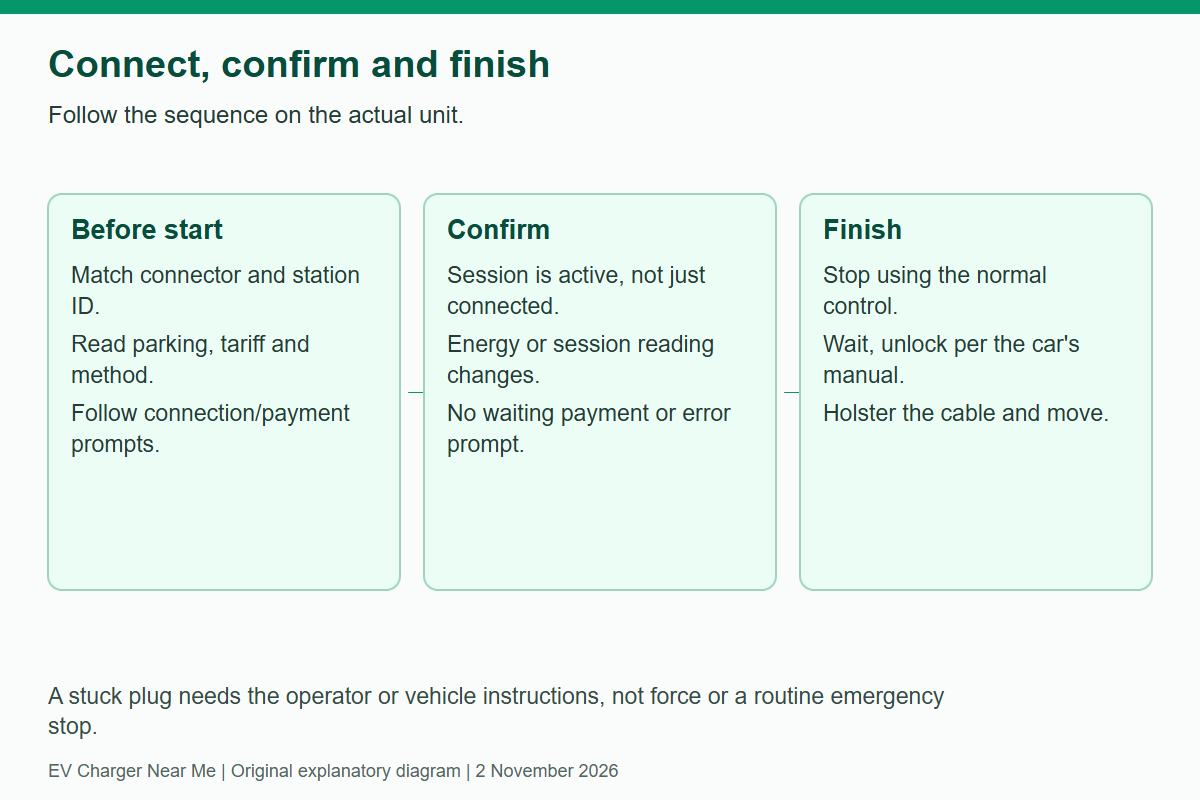
Before leaving the bay, check three things:
- The charger and vehicle have finished communicating.
- The screen confirms an active charge, with an energy or session reading that changes.
- No payment request or error message is waiting for your response.
A display showing “connected”, “waiting” or an authorisation request may mean another step is needed.
If the session doesn’t start, recheck the selected connector, payment approval and the vehicle’s charge limit or schedule. Read the actual error message before retrying. Note the station ID and call the operator’s support number if the problem persists; those details help support staff identify the unit.
Don’t repeatedly press controls without knowing what they do. In particular, an emergency stop is not the routine way to cancel an unsuccessful session. Use the normal stop process shown on the unit or in the app, and follow support instructions if the cable remains locked.
Stop, unlock and move the car
Use the stop control for the payment method you chose. Evie’s Tap & Go instructions specify tapping the same card again and selecting Stop. Other sessions may be stopped through the app, charger or vehicle, according to the equipment’s instructions.
Wait for the session to end, then unlock the connector as directed by your vehicle handbook. Don’t force a stuck plug. If it won’t release, check that the session has stopped and contact support. Return the cable to its holder so it doesn’t obstruct the ground or the next driver’s bay.
Check the final session record and move when you’re finished. If you need to dispute a charge, keep the receipt, station number, time and any error message. Our charging etiquette guide covers shared-bay use.
Frequently Asked Questions
Can I charge without downloading an app?
Sometimes. A supported card terminal, RFID card or previously configured automatic-payment option may work. Check the exact site and payment method; the availability of one option elsewhere on a network doesn’t prove it exists at your stop.
Why is the cable connected but the car isn’t charging?
Connection and authorisation are separate steps. Check the selected plug, payment status, vehicle settings and displayed error. If those don’t resolve it, contact the network with the station ID.
Should I pull harder if the connector is stuck?
No. End the session and follow the vehicle’s normal unlocking procedure. If it remains locked, contact the operator or vehicle support rather than forcing the connector or guessing at a manual release.
Find another charging location through the locations directory.
Compare public charging stops
Compare recorded connectors, power and access, then confirm current details with the operator.
Related guides


Need another charging stop?
Browse recorded charging locations or read more guides on using public equipment.
Find EV chargers All guides